
Genomic Data Submission: Investigator Checklist
According to the NIH Genomic Data Sharing (GDS) Policy, investigators are required to deposit all read-level human genomic data in dbGaP. Non-PHI data can be published so it's publicly available via SPARC. Thus studies generating human sequence data that produce both PHI and non-PHI data follow the two-repository workflow illustrated in Figure 1 below. This SPARC/dbGaP Quick-Reference gives an overview of what file types should go into dbGaP vs. SPARC. Please contact your NIH Program Officer or Genomic Program Administrator (GPA) if you have questions regarding specific dbGaP submission file type requirements.
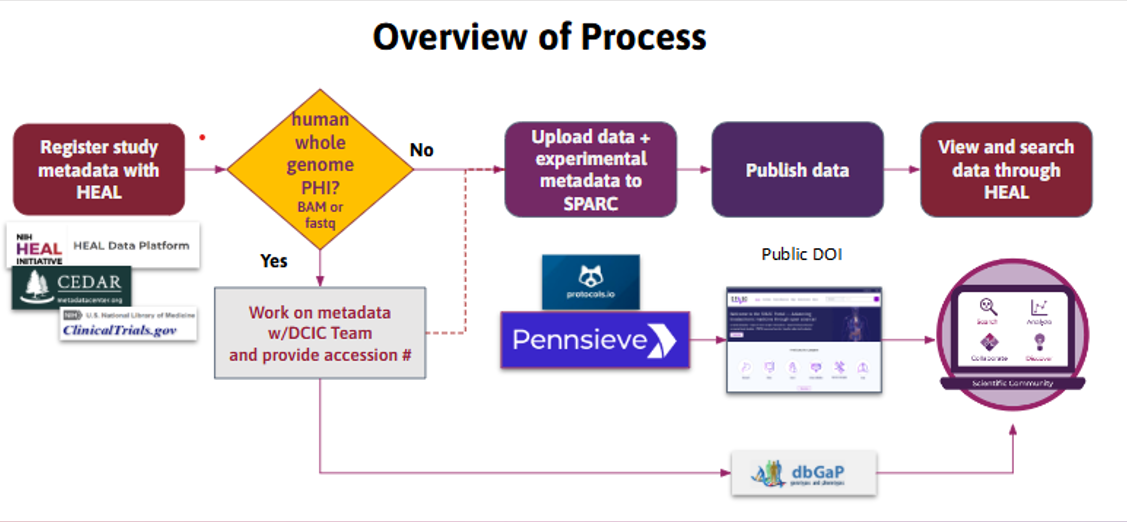
Figure 1. SPARC process for HEAL data that includes dataset submission to dbGaP.
View the YouTube tutorial "Preparing SPARC datasets for dbGaP data submission"
Subject Tracking
Submitting multiple datasets from the same subjects (especially across repositories) requires careful tracking to ensure the full dataset can be both fully understood and reconstructed correctly. Designate a point person to maintain your project's master subject ID spreadsheet so IDs are coordinated across all experiments, collaborators, and datasets (an example of what this might look like is illustrated in Figure 2). Additional details can be found in Linking subjects across datasets.
| Your Lab Master Subject IDs | SPARC Dataset 1 Subject IDs | SPARC Dataset 2 Subject IDs | dbGaP Dataset 1 Subject IDs |
| Dataset DOI or accession → | 10.26275/vpx0-bk5y | TBD (Pending) | phs004229.v1.p1 |
| sub-001 | sub-001 | ||
| sub-002 | sub-002 | sub-002 | |
| sub-003 | sub-003 | sub-003 | sub-003 |
| sub-004 | sub-004 | sub-004 | |
| sub-005 | sub-005 | sub-005 | |
| sub-006 | sub-006 | ||
| sub-007 | sub-007 | sub-007 | |
| sub-008 | sub-008 | ||
| sub-009 | sub-009 | sub-009 |
Figure 2. Example of a Master subject ID spreadsheet. Subject IDs must be identical across SPARC and dbGaP submissions.
Step 1 — SPARC Onboarding & ID Coordination
- Contact the SPARC Curation Team ([email protected]) to discuss your submission and workflow.
- Determine whether your data contains files that should be submitted to dbGaP (see SPARC/dbGaP Quick-Reference).
- Share your "Master subject ID spreadsheet" with the curation team to facilitate tracking subjects across submissions.
- Obtain access to the workspace associated with your SPARC study on Pennsieve - contact Sam Kessler ([email protected]) or the Pennsieve team ([email protected]) to create an account and obtain access.
- Prepare SPARC metadata files following instructions from The Curation Team (subjects.xlsx, samples.xlsx, dataset_description.xlsx, manifest.xlsx).
- Create a dataset placeholder on the Pennsieve platform and reserve a DOI. Share this dataset with the Curation Team.
Step 2 — dbGaP Registration
- Contact your NIH Program Officer or GPA to request study registration in the dbGaP Submission System.
- Confirm with your GPA that the consent groups (Data Use Limitations) determined by your IRB are registered. The Curation Team cannot set these for you.
- Accept your dbGaP Submission Portal invitation within 7 days of receiving it, or it expires.
- Complete the Study Data Outline in the Submission Portal.
- Record the dbGaP study accession (phs######.v#.p#) issued on completion.
Step 3 — SPARC Data Upload & dbGaP File Conversion
- Enter the dbGaP study accession number in the master subject /sample ID spreadsheet for each submission (see second row in Figure 2 above).
- Record the phs# in your SPARC dataset_description.xlsx file (Related Identifier field).
| Related protocol, paper, dataset, etc. | |
|---|---|
| Identifier description | dbGaP study ID |
| Relation type | IsDerivedFrom |
| Identifier | https://www.ncbi.nlm.nih.gov/ |
| Identifier type | URL |
Figure 3. Example of dbGaP information in a SPARC dataset_description.xlsx file.
-
Complete and upload all required metadata and non-genomic experimental data to SPARC / Pennsieve.
-
Notify the SPARC Curation team once you have added the phs# in your
dataset_description.xlsx. -
Wait for curation to complete. The Curation Team adds the metadata elements that link your dbGaP subjects to your SPARC subjects, including SOURCE_SUBJECT_ID_dbGaP in subjects.xlsx.
-
Convert SPARC metadata files using the Pennsieve tool on the platform to generate your dbGaP submission files.
🚧 Do not run the converter before curation is complete
-
Ensure Subject and Sample IDs match across submission metadata.
Step 4 — dbGaP Sequence File Submission
Submit in this order. dbGaP gates each stage on the one before it.
- Upload the converted metadata files to the dbGaP Submission Portal — Subject Consent, Subject Sample Mapping, Subject Phenotypes, Sample Attributes, and their data dictionaries.
- Upload Data_Availability_and_Repository_Split.txt as a study document, exactly as generated.
- Complete the Study Config web form at this stage.
- Wait for dbGaP to validate and load your subject IDs, sample IDs, and consents. Each sample is assigned an NCBI BioSample ID.
- Complete the sequence metadata spreadsheet dbGaP emails you. Do not edit the column headers, and use only the provided controlled vocabulary.
- Upload the completed sequence metadata spreadsheet to the Submission Portal.
- Upload your sequence files (BAM, CRAM, FASTQ) using the ASPERA account named in that confirmation email. Do not upload sequence files before this point.
- Track progress in your Subject Sample Telemetry Report (SSTR) and Study Status Report (SSR).
Step 5 — SPARC Dataset Publication
(This DOES NOT rely on your dbGaP submission and can be done before, in parallel with, or after your dbGaP submission)
- Request to publish your SPARC dataset on Pennsieve.
- Await SPARC dataset publishing review - you will be notified when the review is complete.
Step 6 — Release & Discoverability
- Once dbGaP review is complete and the dataset is published, the controlled data will be accessible via dbGaP Authorized Access.
- Once SPARC review is complete, and the dataset is published, the data will be open access and available via the SPARC Portal.
Key Contacts
| Name | Role | Contact |
|---|---|---|
| SPARC Curation Team | SPARC data organization, identifier linking, and publication assistance | [email protected] |
| Pennsieve Help Desk | General data upload and SPARC → dbGaP Converter Tool (Pennsieve) | [email protected] |
| Your NIH GPA | Genomic Program Administrator — contact your NIH Program Officer | Via the study portal |
| dbGaP Help Desk | Submission System and Submission Portal questions | [email protected] |
Useful Links
Updated 6 days ago